

April 27, 2026 | By Kåre Kaasamoen | 6 min read
Consolidated Invoicing Made Easy in NetSuite with a Simple One-Page Script
Invoice consolidation in NetSuite works well out of the box, but many customers need more flexible options—like combining multiple sales orders from a month into one invoice. What's the best practice to tackle this in a simple way?
By Kåre Kaasamoen, Solution Architect at Staria
NetSuite supports consolidated invoicing and while the standard functionality where you create a consolidated invoice and incorporate other invoices into it is great, it's not always the way how customers want to consolidate invoices. One frequent requirement is the case where you want several sales orders during one month to be consolidated into one monthly invoice. This still needs to be customized.
The best-practice on how to do this is to consolidate the single sales order into one consolidated sales order and then transport this into a sales invoice. In this way, you will have a full audit trail from the invoice, back to the consolidated sales order, then back to the single sales orders and eventually back to the order backing sheets.

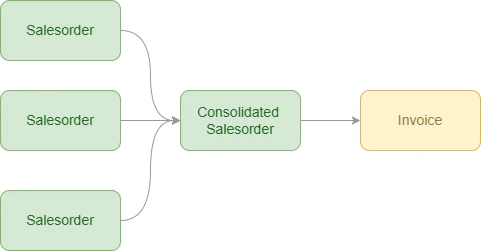
So, how can this model be implemented with a light footprint on customisation and performance? The answer is proper use of the Map/Reduce script type. The Map/Reduce scripts are the real workhorse of the NetSuite script types. They reschedule if governance limit is reached, they "stop-for-the-right" if any urgent and prioritized scripts need space, and they are perfect for doing updates on several transactions in one batch. Nevertheless, consolidation is a use-case which is pretty much made for the Map/Reduce script.
The real magic in this script is what happens between the Map and the Reduce phase. It gives you the ability to pivot a dataset and push out another composition of data in the end of the script than in the beginning of it. It has native functions to convert datasets, and that's what we will utilize to make consolidated invoices. Let’s see how sweet and simple it can be done.
Get The Data
First, pull out the data in an efficient way. Since SuiteScript 2.1 was introduced, you have had the possibility to use string literals, which basically means a simpler way to add variables into a string. One area where this is extremely useful is when you create SQL queries to use with the SuiteScript N/Query module. SQL queries is reported to be up to 30% faster then saved searches. Out from personal experience I will say it's more.
And, in a SQL query you can join in several levels, so a carefully tested and thought-out SQL query can return a large amount of data in seconds or milliseconds, in a case where you may need nested saved searches earlier on. Needles to say that this has a positive impact on performance. In general, SQL is the most efficient way to pull data from NetSuite.
The use case of this example is to consolidate several invoices into one monthly invoice. To start, I therefore need all sales orders that are ready for billing at the end of the month. Sales orders that are ready for billing has the status "PendingBilling".

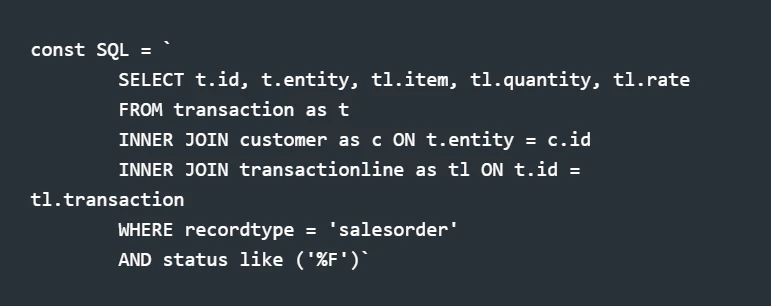
Use the query in the getInputData() stage of the map/reduce script. Add only one very simple line of code, just to return the SQL query.


With only one SQL query and one line of code, you have pulled out the data of all salesorder lines pending billing. That's a good start.
The Map/Reduce conversion
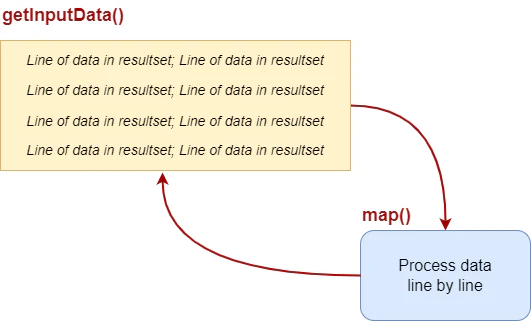
The structure of a map/reduce script is the following. In the getInputData() stage, you get the data necessary to run the script. The query, search or object entered in this phase returns a data result set to the script. The result set has a certain number of lines, and each line is represented with a (primary) key. In the map() stage, you can process the data on a line level. If you query for sales order lines, and one salesorder has 4 lines, then the result set for this sales order will contain four lines, and the map() stage will be executed four times.

As an example, if you run the query above, it will return the following dataset to the map() stage.

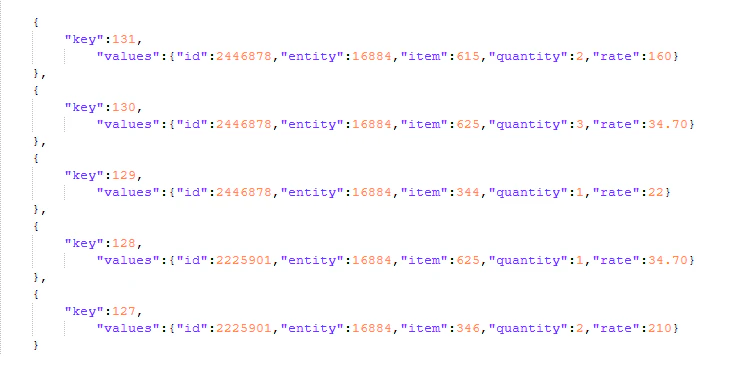
Each key is one iteration or "run" of the map stage. As you may see of the dataset, the "key" is the running number used as primary key of the dataset. The "id" field is the transaction value - the sales order, while "entity" is the customerId. As said, the map() stage runs once for each line on every sales order. Since the use case is about consolidation, we don't want to process data on this level. We want to handle one transaction pr. customer.
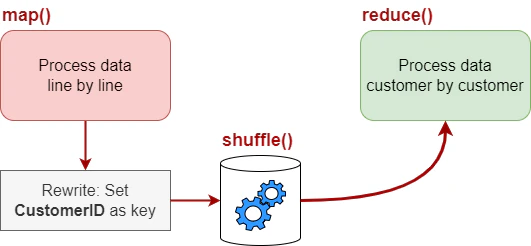
This is where the map/reduce script has it's power. Between the map and the reduce stage, you have the possibility to swap the primary key of the data set. In the map stage, the primary key is a running number for each sales order line, in the reduce stage, we want the primary key to be the customerid for the consolidation. We want to group the data. The way to do this is is to rewrite the key:value pair. Then a "hidden" stage in the map/reduce script, the shuffle stage, will be used to regroup the dataset before it enters the reduce stage.
In the map stage, key is a running number, and value is the actual result set you queried. I want the customerid to be the key, but the query data is still needed and can be leaved unchanged. By rewriting the context.key to the entity field, the data can be shuffled.

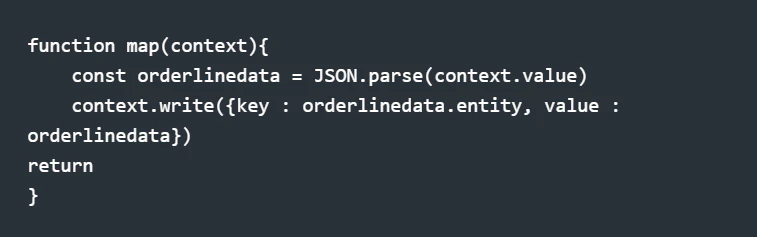
Now, the magic happens. The hidden stage in the map/reduce script rewrites the dataset with the new primary key. The new dataset will use the entity field as the unique identifier, which means the the reduce stage will not run once pr. sales order line, but once pr. customerid.

For each iteration of the reduce() stage, this is now the dataset that is returned.

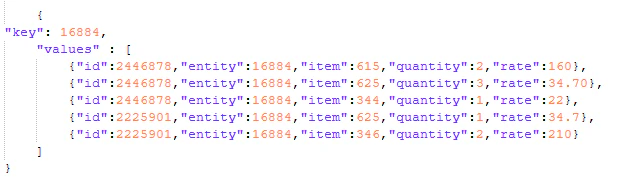
And this is extremely powerful. You have practically only created one SQL query and written three lines of code, but still you are done consolidating the sales order. The map/reduce script did the job for you in the hidden shuffle stage.
The Consolidated Transaction
What is remaining is to create the consolidated sales order as shown in the codesnippet below. Of course you would usually add more values to the transaction, and it is also possible to script the transport from the consolidated sales order to the invoice, but as an example, the following lines of code is all that it takes to create the consolidated transaction.

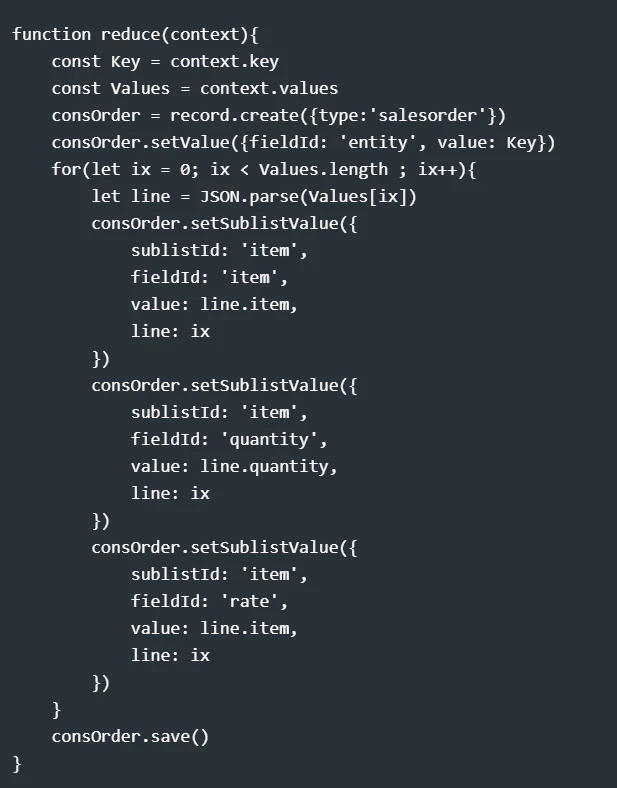
So, to consolidate several sales orders into one invoice, all you need is a script that fits in one page of the code editor. The magic of the consolidation is not in your code, it is in the built in functionality of the SuiteCloud platform
.....real low code.
Check out more in-depth content on NetSuite:
Blogs
Webinars

Kåre Kaasamoen
NetSuite Solution Architect
Staria