

July 30, 2026 | By Kåre Kaasamoen | 5 min read
NetSuite Transaction-handling Using SuiteQL
This post shows how to use cleverly built SuiteQL queries in combination with SuiteScript to ease handling large amount of transactions effectively in NetSuite.
By Kåre Kaasamoen, Solution Architect at Staria
In NetSuite SuiteScript, handling transactions effectively is crucial for high-performing and failproof customizations. Using suitescript 2.1 in combination with cleverly build SuiteQL queries help you a lot on the way. Best practice in scripting is usually; Read your data once, handle all logic in memory, save your data once. This sounds relatively easy, but suddenly you have a case where you need to handle a large amount of transactions, and where you need data from several transaction sublists. Then the "read data once" can be a bit more tricky.
This article describes how you can read and transform data from hundreds of transactions, using a single query only, and make it ready for further processing - with tiny script governance usage.
Denormalized Query
Either you use SuiteQL queries or a saved search; when you pull data from transactions, you will get a flat datatable. A flat table basically means that if you pull data from several tables, all data from all tables are reproduced in each line of the data. As an example, transaction PO54 has 4 item lines. If you query headerlevel only, the query resultset will have one line of data. If you pull out data from the itemlines as well, there will be four lines of data, where the headerlevel data is copied onto each of the four lines. If you pull out data from several sublists, the number of lines exponentially increases.
You can use a simple formula to calculate the number of lines. In the example above, you also need information about linked records. There are two related records on the purchase order. With one transaction, four items and two related records, the number of lines in the result set will be:


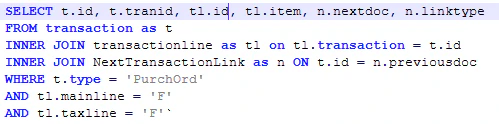
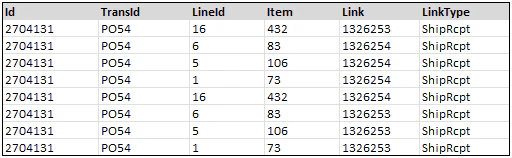
So if you create a query based on the template below, on the data described in the example, it returns the following 8 lines of data - as a flat, denormalized table. The effect will be pretty much the same if you choose to use a saved search to produce a dataset.


Normalize The Dataset
Normalization is the process of splitting a denormalized structure (the flat table) into a system of tables using the rules of the relational model. The transaction header data, the item data and the link data needs to be splitted into three different datastructures, but referenced/linked together.
In SuiteScript code, this conversion means to re-arrange the data in a JSON object. In a database, it means re-arranging into different tables. Nevertheless, the method is the same. We need to create a 1-to-many relationship, where the headerdata is the 1-side of the relation, and the links and the items are the many side.
In relational databases, primary and foreign keys are essential elements. The primary key is the unique identifier of a row in a table. On the many-side of a 1-to-many relationship, the primary key is still the unique identifier of for instance the itemline, while the foreign key is a link/reference to the primary key of the parent table - the header.
If you look to the query resultset, you will see that we have all the data necessary to create the relation. On each line we will find all the necessary primary key of the tables (transid, lineid and linkid), and both the item data and the linkdata can be linked against the transaction (transid). We have all the primary and foreign key data available to normalize.
The rules of normalization is so general, that it is possible to write a function, that converts the data into a normalized structure. I created the normalizeTable function. The function needs to be called for each of the tables needed in the normalized dataset.


For each of the tables needed in the normalized structure, the function takes the dataset (the query resultset), the primary key, for the tables on the many side; the foreign key, and a list of remaining field as arguments.
The function returns either a table on the 1 side of a relation - the foreign key argument is blank, or a table on the many side of a relation - the foreign key is the primary key of the 1 side table.
When running both the transactionheader data, the items data and the links data through the normalizeTable function, the dataset is transformed into the following normalized structure

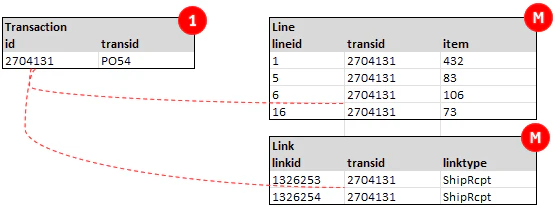
Technically, all structures are handled as JSON objects in the javascript code, but logically, this is the datastructure that comes out of the normalization.
The NetSuite Transaction Object
A NetSuite transaction object is programmatically a hierarchical JSON/XML structure. When the query is normalized, the transformation into the netsuite standard structure is rather simple. A netsuite transaction as a JSON object, is typically the header fields listed, then an array of fields for each of the sublists involved.
Lets say the normalized structure above is a query that returns 200 purchaseorders, then the Transaction table will contain 200 lines. You then need to loop through the 200 lines, create transaction object header fields for all of the 200 lines, then create an array of lines and an array of links for each of the purchase orders.

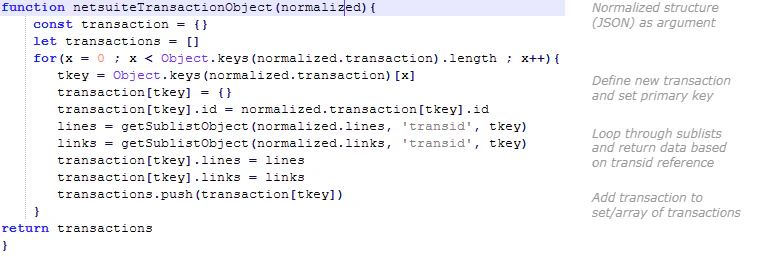
In your code, you have now converted a single large query resultset, into a well-formed NetSuite standard hierarchical structure. If you for instance need to export the purchaseorders in an integration, using REST API or similar, the data is ready to be processed directly and still you have only used 10 usage points of your script governance limit. Read data once, save data once.
Check out more in-depth content on NetSuite:
Blogs
Consolidated Invoicing Made Easy in NetSuite with a Simple One-Page Script
Mastering NetSuite Business Intelligence: A Guide to Enhanced Reporting, Planning and Forecasting
Webinars

Kåre Kaasamoen
NetSuite Solution Architect
Staria